
Your Website Headings Actually Matter for SEO

PSA: Your website headings are not just there for vibes. Not only do they help your readers understand your content, but search engines actually pay attention to them! Heading tags, length, content… it’s all taken into account.
Wait, You Lost Me. What is a Heading Tag?
The technical speak for the headings on your webpage, from the top headline to the titles for each section. Heading tags refer to the HTML code that defines which of the six different heading tags you’re using, from H1 to H6. The number not only indicates its size (H1 = largest), but also the importance (H1= Most important). (Don’t worry, we’ll get into that more.)
So on the forward-facing side of a page, you may see:
I AM A BIG H1 HEADLINE
On the backend, it’s:
<h1> I AM A BIG H1 HEADLINE </h1>
That HTML is how browsers, search engines, and accessibility technology like screen readers sort through your content. Without that code, you just have large bolded text that Google is referring to as regular text (IE, a missed opportunity!).
So headings, headlines, heading tags—these terms can be used interchangeably, but all pretty much amount to the same thing!
How to Optimize Website Headings for SEO
Headings are a great, low-lift way to get Google’s attention! All you need to do is remember that they actually matter, and why. All you need to do is remember 5 simple tips for structuring website headings that are reader AND SEO-friendly.
1. One H1 per page
This is my first tip because it’s not only the most important but also the most common mistake I see among my new clients. I’ll either see no H1s… or too many! This is an SEO must. The H1 headline is the most important heading tag. It tells search engines, “Hey! This is exactly what this page is about”. Your H1 should clearly state the purpose of your page, and include your focus keyword.
If your page has more than one H1, you’re just sending Google around in circles trying to figure out what the point of the page is. I like to think of confused Google like Lucille Bluth—“I don’t understand the question, and I won’t respond to it”.

But What if I Don’t Want My H1 to be the Biggest Heading?
Yes, you CAN have an H1 that isn’t the visually largest on the page! Take my own home page, for example.
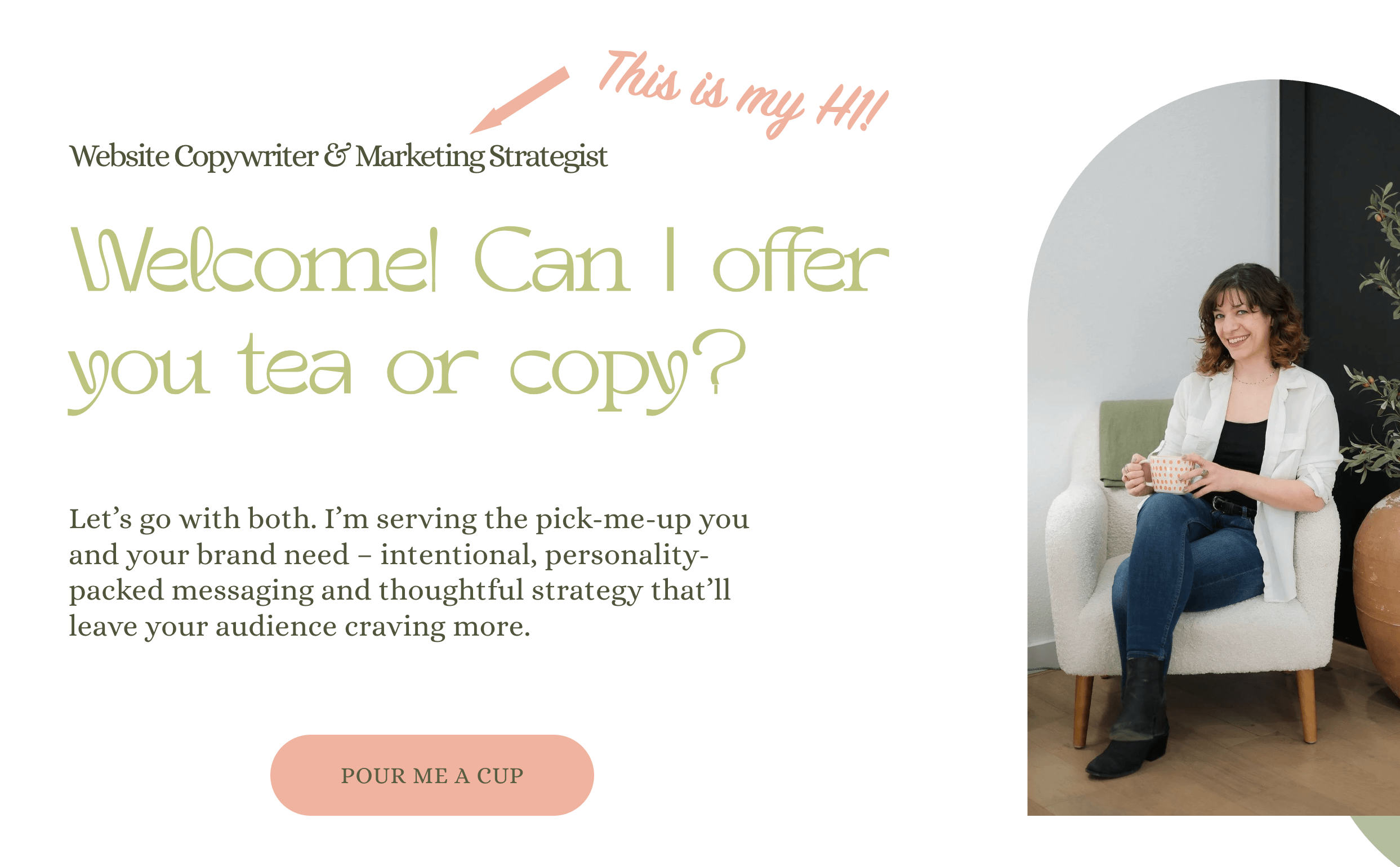
I wanted “Welcome, Can I Offer you Tea or Copy?” to be the statement headline. But that I’m a ‘website copywriter and marketing strategist’ is the most important part of my home page, and what I want Google to pay attention to. So I employed some HTML to make my H1 look smaller, but no less important in Google’s eyes.
Some web builders have built-in features that can adjust how your heading tags are styled, or this is where some custom HTML can come into play. I use Squarespace, which has the Scaled Text feature—it’s not perfect, which is why I sometimes need to rely on a lil’ coding to get the results I’m looking for.

Special Note about Blog Titles
Most website builders automatically format blog titles to be the H1 heading (such as Squarespace, Wordpress, Wix, and Showit). So, just create an optimized title—no manually adding an H1 needed!
2. Heading Hierarchy
Now we know the H1 is the most important headline on your page. But that doesn’t mean the other heading sizes aren’t pulling their weight! Headings 2-6 further support your main topic by organizing your content, which both humans AND search engines will thank you for! The order in which you use your headings plays a big part in that organization.
H1: The Big Daddy, AKA the main topic of your page.
H2: The supporting topics to back up your H1.
H3: Sub-points within your H2.
H4-6: Sub-sub points.
As a Type A-organization nerd, I like to think of heading hierarchy as folders on a computer.

Search engines look at that sizing and order to establish the most important topics of your page. Keep the internet gods happy by using heading tags in the right order—for example, don’t skip from an H1 straight to H4.
3. Include Keywords in Your Headings
Now that we know search engines use headings to sort and understand your page’s contents, this is where you want your page’s keyword to be. Keywords=the phrases your audience is searching for. DEFINITELY in your H1, then sprinkled organically throughout your supporting headings, including variations of your keyword. Ideally, your keyword will also be towards the beginning of your sentence. But most importantly:
Prioritize copy that sounds natural—don’t cram your keywords in if they sound janky! That’s called “keyword stuffing”, and the internet gods will not look favorably upon you for that. If keywords don’t naturally fit in, that’s fine! Because you also want to….
4. Use Concise, Descriptive Wording
I can appreciate poetic vibes, but you want your heading to make it super clear what the following text is going to be about. Keep it snappy. People, SEO, and screen readers prefer quick, scannable text.
For H1’s, the recommended length is usually between 20-70 characters. Queen H1 gets a more specific character limit because of how important it is in SEO’s landscape. For the rest, a good rule of thumb to follow is no more than 10 words per heading.
Bonus points: frame your headlines as questions! Users typically type their searches in as questions, so this aligns your headings to that. Google loves a question-headine. The questions you pose, and how well you answer them, increases the chance of your content being shown in Google snippets (the summary that shows on the search results page).
5. Use Headings to Break Up Content
Imagine this blog post didn’t have a single heading.
It was just one massive wall of text.
You know your eyes would glaze over so fast.
That’s some crappy readability and a poor user experience. And search engines know that! SEO, at its core, is about the user experience. To quote my buddy Semrush: “...Good UX isn’t just nice to have—it’s crucial for ranking highly in Google.”
Google knows you ain’t reading all that. Headings break up your content into organized, digestible sections. Your brain thanks you, search engines thank you.
They also serve the skimmers.
Yes, I want you to read and pore over every word I’ve painstakingly written for you. But the truth is, we’re all busy! You want information, and you want it FAST! I want to meet you where you’re at.
With clear headings (see above: concise wording) that indicate what each section is about, your can quickly dart through this blog to learn the most important takeaways.
So, With These Tips in Mind…
Go ahead and give your website another looksee to make sure you’ve got the heading basics down! If your eyes are glazing over at the thought…
I’d love to do it for you! When I perform SEO Audits and Refreshes, your heading structure is one of the first elements that I look at. I’ll tell you exactly how to optimize your headings so that they actually support your site’s content, including formatting and copy.
If you think your website needs a refresh that goes beyond your headings, I’m your website copywriting gal! Whether you need support with your SEO or website copywriting, I’d love to help—connect with me here!